

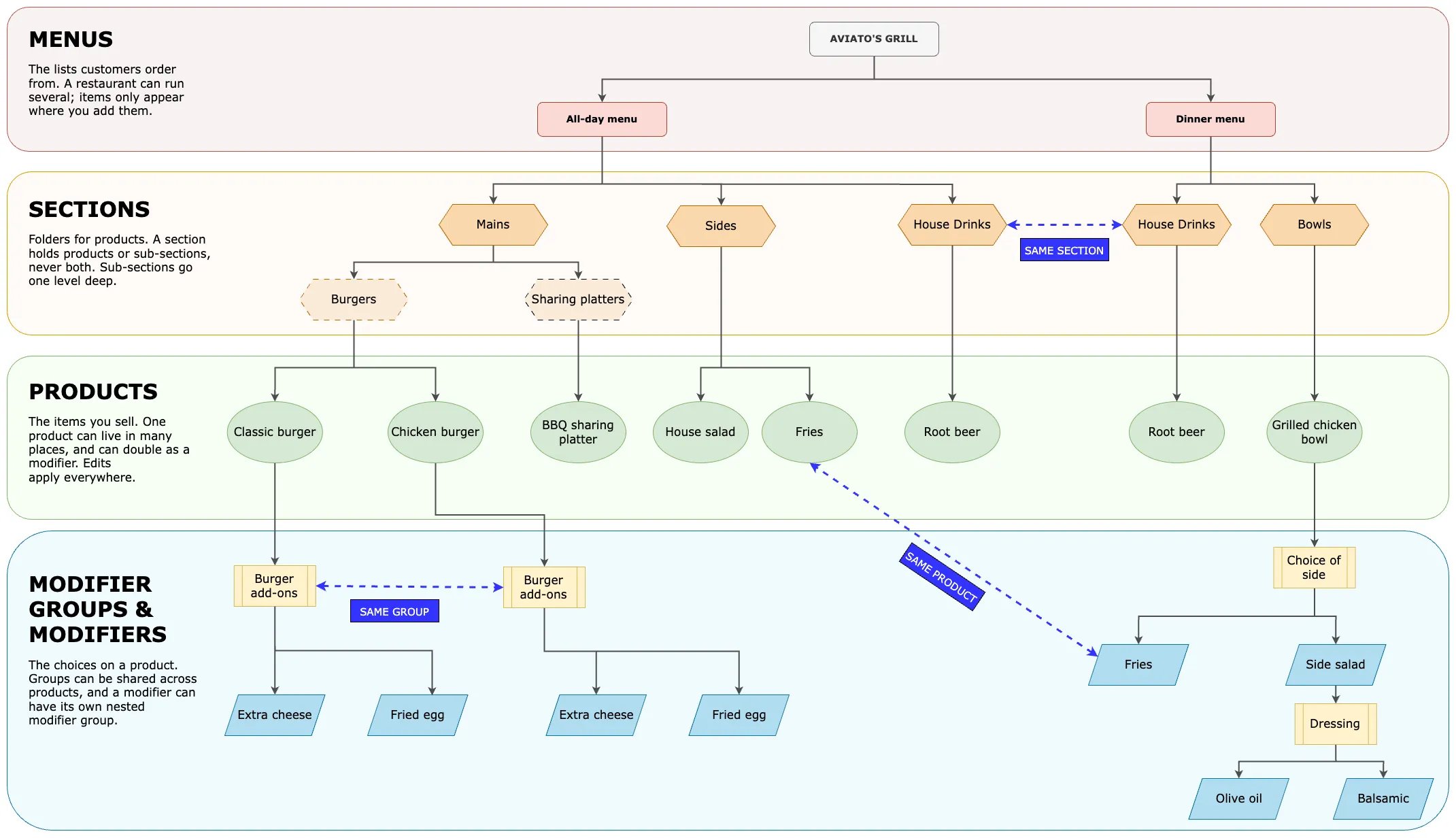
An Atlas menu hierarchy, from menus down to nested modifiers.
Menu hierarchy on Atlas
- Menus are the lists your customers order from, such as an All-day menu or a Dinner menu. A restaurant can run several. A product appears only on the menus you add it to.
- Sections are folders that group products inside a menu, such as Mains, Sides, or Drinks. A section holds either products or sub-sections, never both.
- Sub-sections split a section one level deeper, such as Burgers and Bowls inside Mains. Sub-sections go one level deep only.
- Products are the items you sell, such as Classic burger, Fries, or Root beer. The same product can sit in more than one section, and it can also act as a modifier.
- Modifier groups are the choices on a product, such as Burger add-ons or Choice of side. They set how many options a customer can pick.
- Modifiers are the options inside a group, such as Extra cheese or Fried egg. Every modifier is itself a product or component.
- Nested modifier groups are a modifier group attached to a modifier, such as Dressing on a Side salad. They work like any other modifier group, except their parent is a modifier instead of a product.
Nested modifier groups have two limits:
- They allow only one choice (a maximum selection of 1).
- Aggregator platforms such as GrabFood and Foodpanda do not support them.
Sharing parts of the menu
Most parts of the hierarchy can be used in more than one place. You add an existing one instead of building a copy, so there is a single item to keep up to date.- A section can appear in more than one menu. House Drinks can sit on both the All-day and Dinner menus.
- A modifier group can be attached to more than one product. Burger add-ons can apply to both the Classic burger and the Chicken burger.
- A product can also be used as a modifier. Fries can sell as a side and appear inside Choice of side.
Products also carry Printer / KDS / Dispatch tags. These decide which printer or kitchen screen an item prints on. They do not change what the customer sees. See Item routing and printers.
Where to go next
Create and configure menus
Build a menu from scratch with sections, products, and modifier groups.
Update prices
Change a single price or update prices in bulk by CSV.
Pricing rules
Set different prices by channel or outlet, such as higher prices on delivery apps.
Aggregator menus
Set up and sync your menu on GrabFood and Foodpanda.
Set availability conditions
Show or hide items by time, day, or other rules.
Reporting categories
Group products so they roll up correctly in your reports.
Set up POS layouts
Arrange how items appear on the POS screen for your staff.
Item routing and printers
Route each item to the right printer or kitchen screen using tags.