

X-Channel-Id and X-Session-Id headers as the Storefront API.
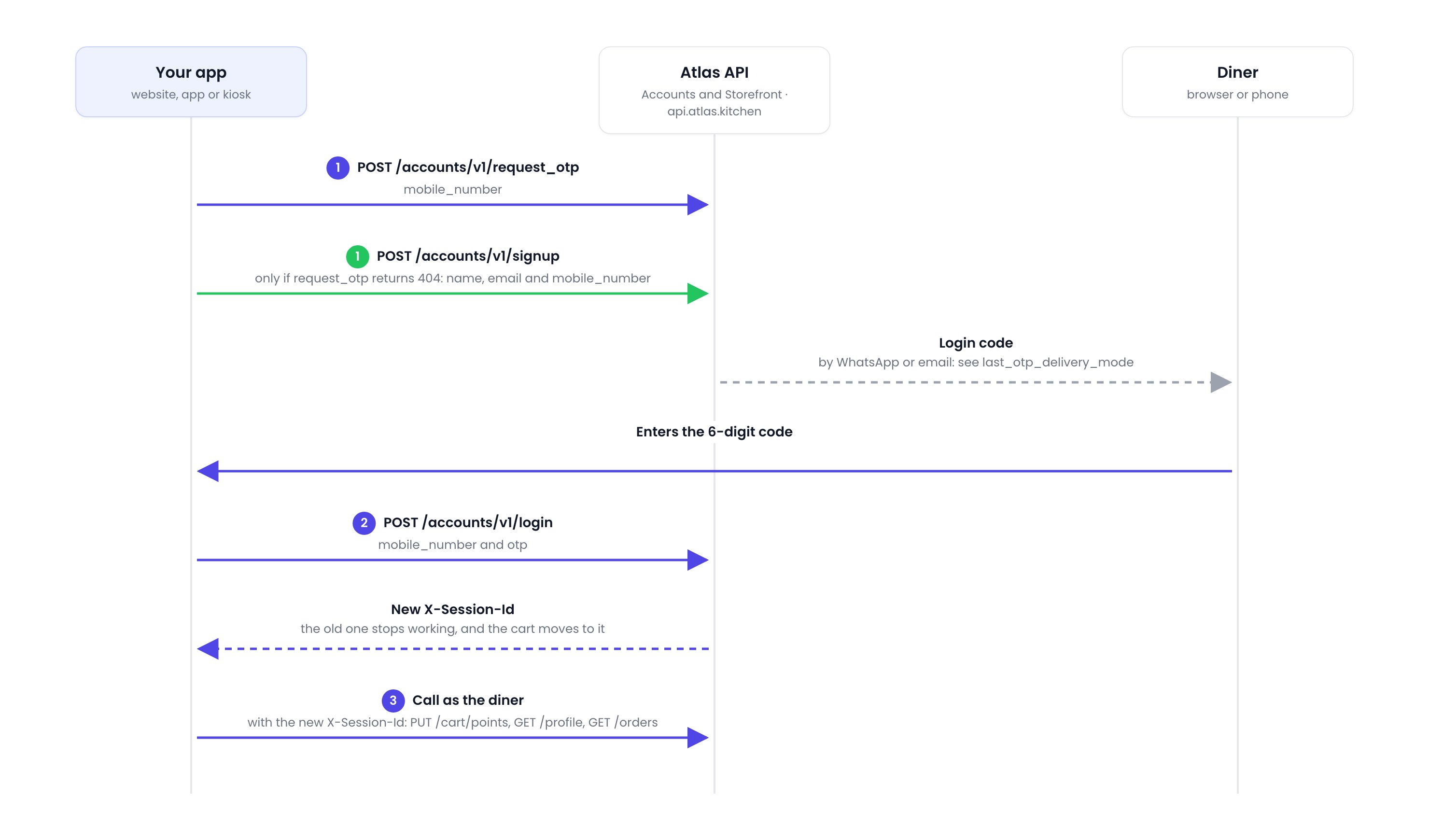
Sign-in flow. The green step is only for a diner with no Atlas account.
Sign in a diner who has an account
1
Request a login code
Call Request login code with the diner’s mobile number.
last_otp_delivery_mode in the response says where the code went: whatsapp or email. Tell the diner where to look.A new code replaces the last one, so only the latest code works. A number or email can get 5 codes in 10 minutes.2
Log in with the code
Call Log in with the same mobile number and the 6-digit code.After 5 wrong codes, log in stops working until the diner requests a new code.Save the new
X-Session-Id from the response headers and send it from now on. The old one stops working. The diner’s cart moves to the new session, ready for Toggle points.Sign up a new diner
If Request login code returns404, the diner has no Atlas account yet. A diner who already has one, from any Atlas merchant, gets a code straight away and can log in.
- Call Sign up with their name, email and mobile number. It sends them a login code.
- Call Log in with that code.
Points belong to the merchant
Each merchant has its own point program, so a diner’s balance differs between merchants.Sign a diner out
Delete the savedX-Session-Id and call GET /storefronts/v1/channel without one. On shared devices such as kiosks, do this after every order.
If it doesn’t work
422Please wait: a code was sent less than 30 seconds ago. Wait, then try again.429Too many codes requested: this number or email has had 5 codes in 10 minutes. Wait 10 minutes.429Too many wrong codes: 5 wrong codes were tried. Request a new code.422User Existsfrom Sign up: log the diner in instead.422otpis incorrect: wrong or expired code. Request a new one.401session_id: use the session ID from the login response.401login: no diner is signed in. Sign them in first.403mobile_number: the number isn’t verified. Sign in with a code to verify it.