> ## Documentation Index
> Fetch the complete documentation index at: https://help.atlas.kitchen/llms.txt
> Use this file to discover all available pages before exploring further.
# Logistics report
> Atlas Smart Logistics trips and costs.
**Available for:** Server Cashier Manager Finance Admin
[Go to report →](https://portal.atlas.kitchen/logistics-report)
## What this report shows
Track and reconcile logistics costs for Atlas Smart Logistics deliveries. View trip details, monitor uninvoiced trips, and verify weekly invoices.
This report only shows data for deliveries made through Atlas Smart Logistics (Lalamove, Pandago, etc.), not third-party platform deliveries.
## Filters
The date filter changes based on the selected tab:
 **Invoice date** — Filters by when invoices were generated.
 **Trip date** — Filters by when deliveries happened.
Additional filters on trip views: **Outlet** and **Brand**.
## Sections
### All trips
Every logistics trip with cost breakdowns and summary metrics.
**Trip date** — Filters by when deliveries happened.
Additional filters on trip views: **Outlet** and **Brand**.
## Sections
### All trips
Every logistics trip with cost breakdowns and summary metrics.
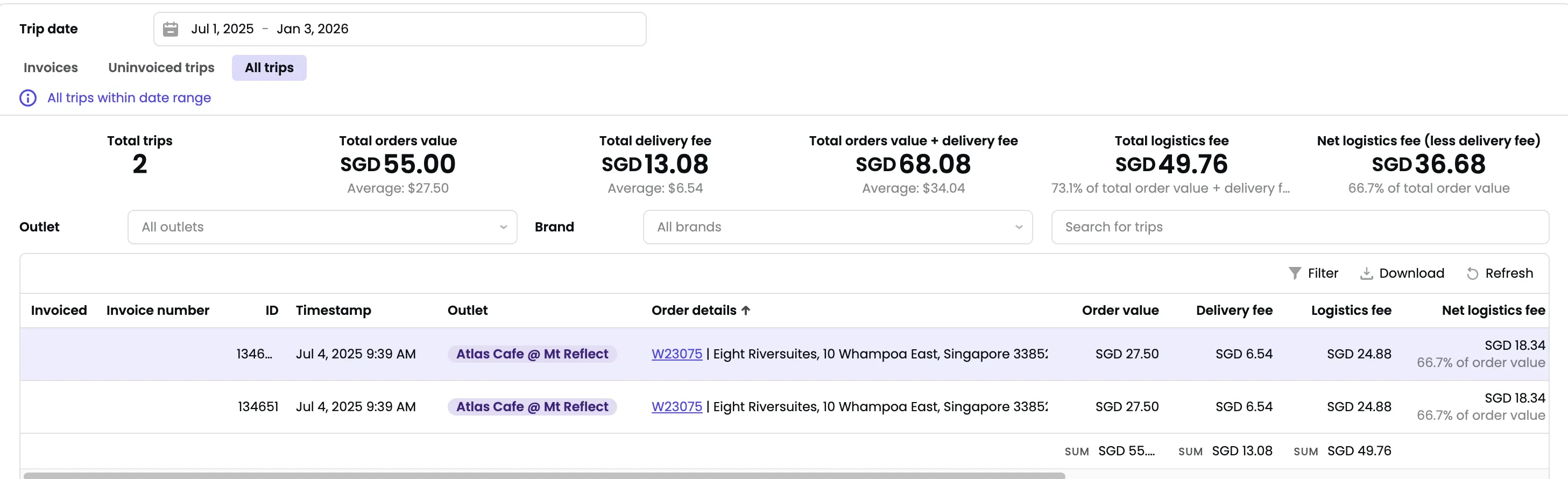 **Summary metrics:**
* **Total trips** — Number of delivery trips.
* **Total orders value** — Combined value of delivered orders.
* **Total delivery fee** — What customers paid for delivery.
* **Total orders value + delivery fee** — Combined total.
* **Total logistics fee** — What you pay (platform fees + Atlas service fee).
* **Net logistics fee (less delivery fee)** — Logistics cost minus customer delivery fees.
**Trip columns:** Invoiced status, invoice number, ID, timestamp, outlet, order details, order value, delivery fee, logistics fee, net logistics fee, distance, vehicle type, order source, logistics type.
### Uninvoiced trips
Trips not yet included in a weekly invoice. Use this to forecast your next logistics bill.
**Summary metrics:**
* **Total trips** — Number of delivery trips.
* **Total orders value** — Combined value of delivered orders.
* **Total delivery fee** — What customers paid for delivery.
* **Total orders value + delivery fee** — Combined total.
* **Total logistics fee** — What you pay (platform fees + Atlas service fee).
* **Net logistics fee (less delivery fee)** — Logistics cost minus customer delivery fees.
**Trip columns:** Invoiced status, invoice number, ID, timestamp, outlet, order details, order value, delivery fee, logistics fee, net logistics fee, distance, vehicle type, order source, logistics type.
### Uninvoiced trips
Trips not yet included in a weekly invoice. Use this to forecast your next logistics bill.
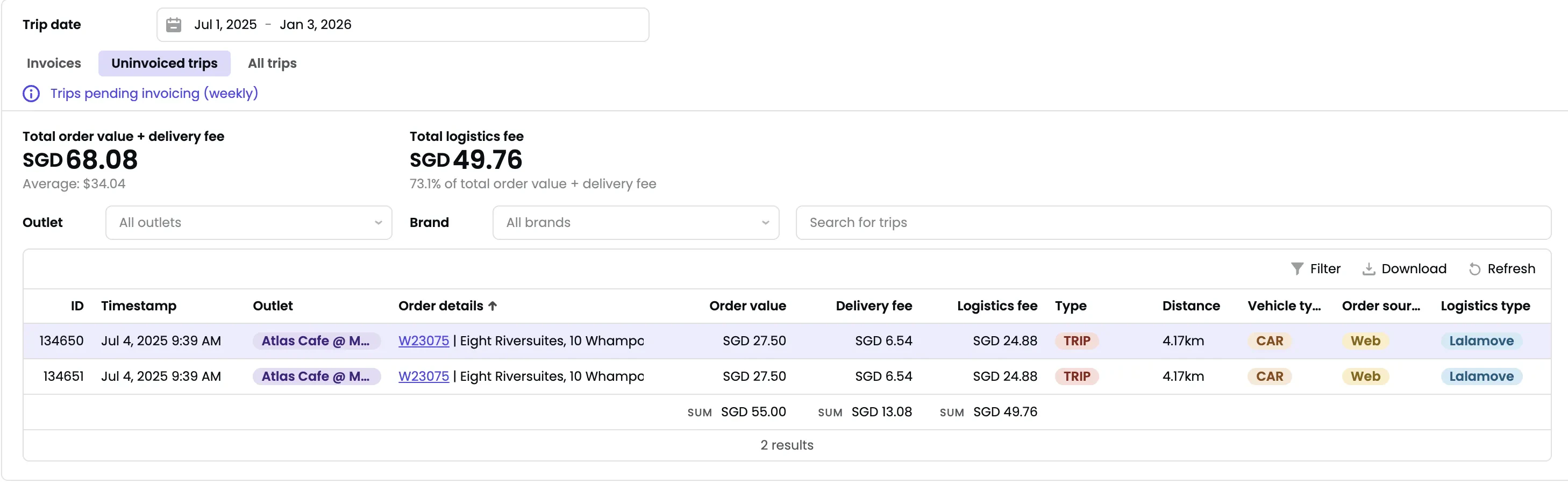 Invoices are generated weekly. Trips appear here until invoiced.
### Invoices
Weekly logistics invoices from Atlas. Each shows invoice number, subtotal, invoice date, and invoice period.
Invoices are generated weekly. Trips appear here until invoiced.
### Invoices
Weekly logistics invoices from Atlas. Each shows invoice number, subtotal, invoice date, and invoice period.
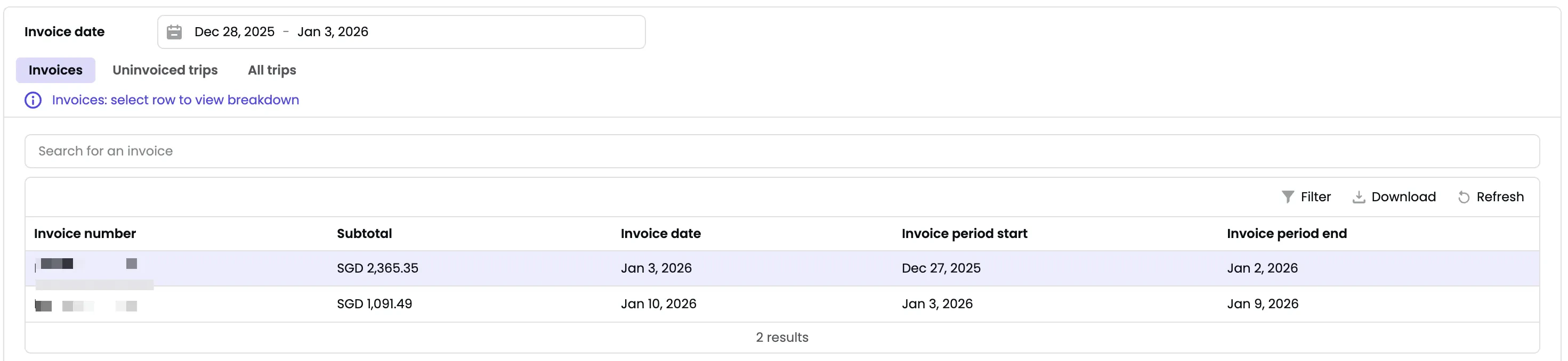 Click any invoice to see all included trips and reconcile totals.
## Understanding trips vs orders
One order can have multiple trips when:
* A large order requires multiple drivers
* A redelivery happens after the original trip
Multiple rows with the same order ID are not duplicates—each is a separate delivery charge.
**Refunded trips** appear as separate rows with negative logistics fees.
## Exporting
* **Download** — Export trip data or invoice details.
* **Filter** — Narrow down results before exporting.
Click any invoice to see all included trips and reconcile totals.
## Understanding trips vs orders
One order can have multiple trips when:
* A large order requires multiple drivers
* A redelivery happens after the original trip
Multiple rows with the same order ID are not duplicates—each is a separate delivery charge.
**Refunded trips** appear as separate rows with negative logistics fees.
## Exporting
* **Download** — Export trip data or invoice details.
* **Filter** — Narrow down results before exporting.