> ## Documentation Index
> Fetch the complete documentation index at: https://help.atlas.kitchen/llms.txt
> Use this file to discover all available pages before exploring further.
# Install Atlas Merchant Portal
> Add Atlas Merchant Portal as a home screen shortcut on your tablet for faster access. Works on Chrome and Safari browsers.
Atlas Merchant Portal can be accessed from any device at [https://portal.atlas.kitchen](https://portal.atlas.kitchen) and a valid login.
For the best experience on your tablet, install an Atlas screen shortcut on your device:
1. Open Atlas Merchant Portal ([https://portal.atlas.kitchen](https://portal.atlas.kitchen)) in Google Chrome or Safari.
2. Tap the menu icon (three dots on Chrome, share button on Safari).
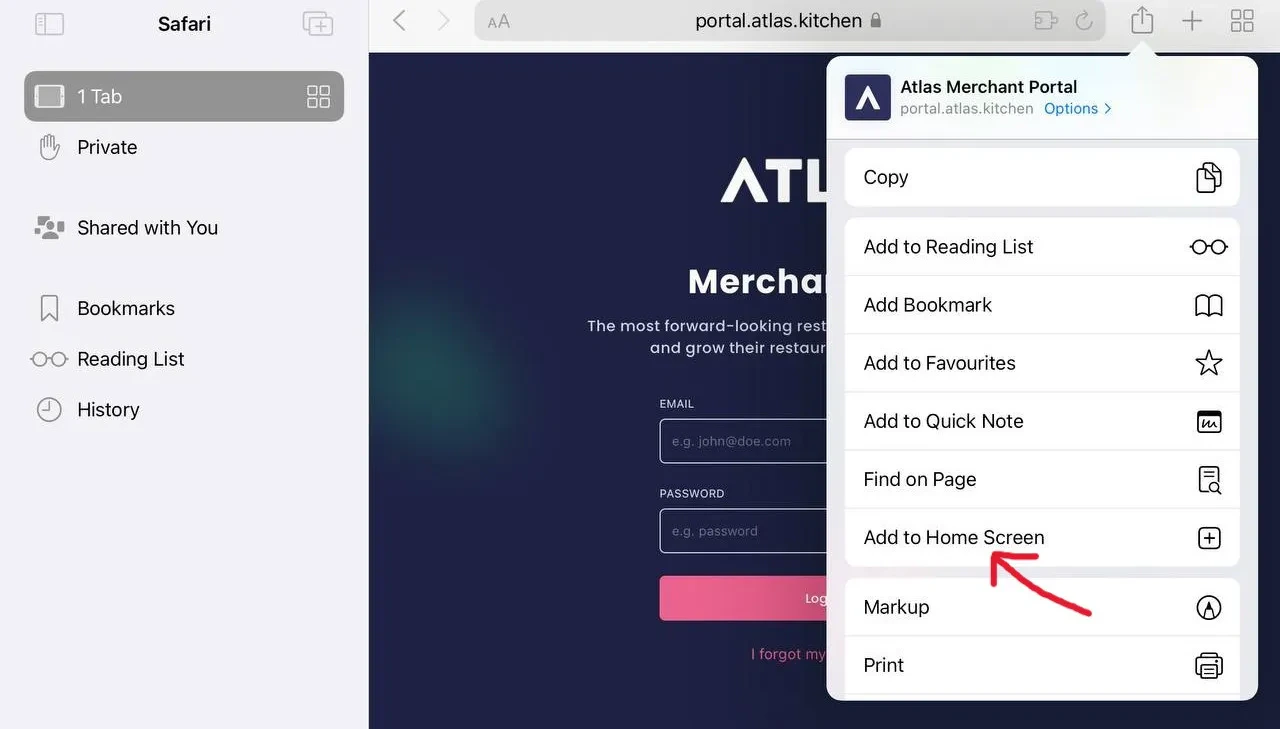 3. Select "Add to Home Screen".
4. Rename it to Atlas and tap Add.
3. Select "Add to Home Screen".
4. Rename it to Atlas and tap Add.
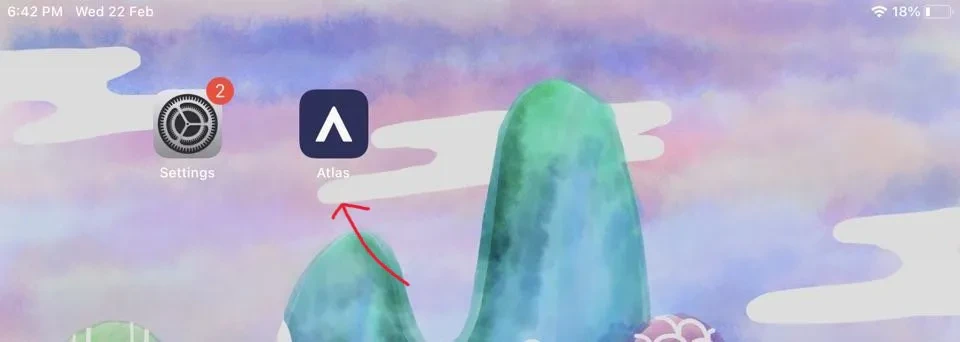 5. Open the new desktop app, and log in with your credentials.
## What should happen
After completing the steps above:
* An "Atlas" icon appears on your device's home screen
* Tapping the icon opens Atlas Merchant Portal in a standalone app window (no browser toolbar)
* You can log in with your existing Atlas credentials
* The app works just like the browser version but launches faster
## If it doesn't work
1. Make sure you're using Chrome (Android) or Safari (iOS) — other browsers may not support this feature
2. On Chrome: Tap the three-dot menu, then scroll down to find "Add to Home Screen"
3. On Safari: Tap the share icon (square with arrow), then scroll down to "Add to Home Screen"
4. On some devices, this option appears as "Install app" instead
1. Check your home screen pages — the icon may be on a different page
2. Check your app drawer or library (Android)
3. Try adding again — sometimes the first attempt fails silently
4. Restart your device and try again
1. Check your internet connection
2. Clear the app cache: Delete the shortcut, clear browser cache, and add again
3. Try logging in through the regular browser first to confirm your account works
1. Check that you're using the correct email and password
2. Try logging in through the browser version first
3. If you forgot your password, use "Forgot password" on the login page
4. Contact support at [hello@atlas.kitchen](mailto:hello@atlas.kitchen) if you're locked out
## Next steps
* [Set up your outlet](/merchant-portal/operating-hours) — Configure your restaurant hours
* [Connect your printer](/hardware/printers) — Set up receipt printing
* [Explore the dashboard](https://portal.atlas.kitchen) — Start using Atlas Merchant Portal
5. Open the new desktop app, and log in with your credentials.
## What should happen
After completing the steps above:
* An "Atlas" icon appears on your device's home screen
* Tapping the icon opens Atlas Merchant Portal in a standalone app window (no browser toolbar)
* You can log in with your existing Atlas credentials
* The app works just like the browser version but launches faster
## If it doesn't work
1. Make sure you're using Chrome (Android) or Safari (iOS) — other browsers may not support this feature
2. On Chrome: Tap the three-dot menu, then scroll down to find "Add to Home Screen"
3. On Safari: Tap the share icon (square with arrow), then scroll down to "Add to Home Screen"
4. On some devices, this option appears as "Install app" instead
1. Check your home screen pages — the icon may be on a different page
2. Check your app drawer or library (Android)
3. Try adding again — sometimes the first attempt fails silently
4. Restart your device and try again
1. Check your internet connection
2. Clear the app cache: Delete the shortcut, clear browser cache, and add again
3. Try logging in through the regular browser first to confirm your account works
1. Check that you're using the correct email and password
2. Try logging in through the browser version first
3. If you forgot your password, use "Forgot password" on the login page
4. Contact support at [hello@atlas.kitchen](mailto:hello@atlas.kitchen) if you're locked out
## Next steps
* [Set up your outlet](/merchant-portal/operating-hours) — Configure your restaurant hours
* [Connect your printer](/hardware/printers) — Set up receipt printing
* [Explore the dashboard](https://portal.atlas.kitchen) — Start using Atlas Merchant Portal